
Fees, services and taxes
Create cleaning, pet, service and tourist tax fees once, attach them to rentals, and see how each is calculated, sent and shown.
- Reference
- Settings Fees
- Web
- iOS
- Android
Updated October 29, 2026
How it works
Create cleaning, pet, service, parking and tourist tax fees under Fees in Settings. Create each fee once for your team, then attach it to the rentals that charge it.
A fee is an amount you add on top of the nightly price. For taxes you charge yourself, choose:
- VAT or Tourist Tax
- City Tax or Local Tax
How a fee is calculated
Each fee has these settings:
| Setting | What it means |
|---|---|
| Kind | Cleaning, Pet, Service, Parking, VAT, Tourist Tax and others |
| Rate Kind | How many times the rate is charged |
| Rate | The amount or percentage |
| Rate Kind | Charged | The rate is |
|---|---|---|
| Fixed | Once per booking | An amount |
| Fixed Per Night | Every night | An amount |
| Fixed Per Person | Once for each guest | An amount |
| Fixed Per Person Per Night | For each guest, every night (a tourist tax per guest and night) | An amount |
| Percentage | Once | A percentage of the base |
| Cumulative Percentage | Once | A percentage of the base |
| Percentage Per Person | Once for each guest | A percentage of the base |
Order and percentage fees
A rental works out its fees in the order of the Priority column of its Rental Fees tab. A fee you attach goes last.
The base of a percentage fee is the rental price after discounts and markup, plus the required fees above it. Optional fees never enter the base. A Percentage fee is not added to the base of the fees below it. Every other required fee is. Put the fees a percentage must include above it.
Required, optional and extras
On each rental you choose whether a fee is required.
- A required fee is added to the price of a quote. A quote for a guest on your website lists each one by name, when its amount is above zero.
- An optional fee is not in the quote. You add it to a booking with Add Fee.
- A fee marked Upsell (Bookable as extra service in the fee form) is sold to guests as an extra, as Sell extras to guests explains.
Only for All-in-One
What the channel manager gets
When you save, reorder or delete a fee on a rental, Rental Ninja queues an update for the channel manager. Eligible updates can include required fees and pet fees that are not marked as extras, regardless of the collection choice. Each fee goes with its name, kind, rate kind, rate and order. Collect at booking time indicates your collection choice for the channel manager. It does not guarantee when the guest pays on a channel. You still connect and publish the rental on each channel: Publish a rental on channels.
Airbnb and the tourist tax
Airbnb reports a stay tax with some bookings and not with others. When an Airbnb booking's price breakdown first arrives or the booking is confirmed, Rental Ninja adds the rental's required Tourist Tax, City Tax or Local Tax fee only if all of these are true:
- The booking from Airbnb carries no stay tax of its own.
- The rental is not in France or its overseas departments, Croatia, Mexico or the United States.
Why it works this way
On an Airbnb booking, Rental Ninja adds your stay-tax fee only when the breakdown from Airbnb has no stay tax and Airbnb does not collect and remit it in the rental's country. Before, guests could be charged the tourist tax twice.
- No fee was added to the booking in Rental Ninja yet.
Where fees and taxes show
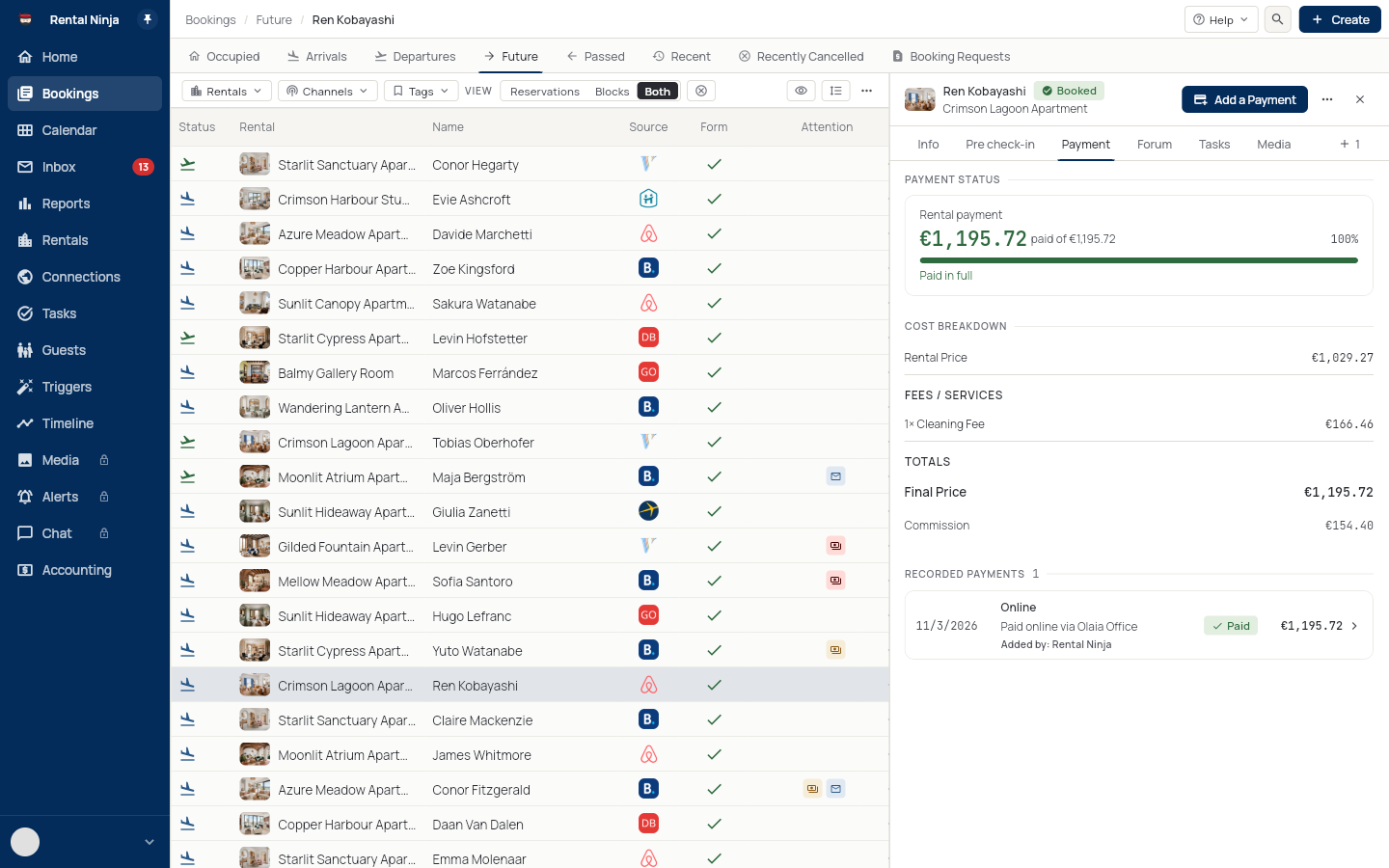
- A booking's Fees section lists its fees and the channel taxes that are not already in the price.
- The payment page of the guest portal lists each fee of the booking by name.
- In statements, a recipient earns from the fees on a booking through fee rules, which match on the fee's name. A tax a channel reports, such as an Airbnb stay tax, is matched only by tax rules.
Who can change them
- Can manage fees creates, edits and deletes the team's fees under Fees in Settings.
- Edit rental rates & availability attaches fees to a rental and sets Required and the order, on rentals Rental Ninja manages.
- Can manage bookings adds fees to a booking. A booking from a channel also needs Fees / taxes.
Owners, administrators and rental managers have all of them by default.
Set it up
- Open Settings, then Fees. You need Can manage fees.
- Select Add Fee.
- Enter a name of at least 2 characters.
- Choose the Kind and the Rate Kind.
- Enter the Rate. A percentage fee takes a rate where 1 means 1%.
- Select Save.
- Open the rental, then Rates. You need Edit rental rates & availability.
- Open Rental Fees.
- Select Add Fee.
- Choose the fee under Select Fee.
- Answer Is this fee required?.
- Under Collect at booking time, select YES to indicate collection at booking. Select NO to indicate collection at check-in.
- Select Save.
- To change the order, use the arrows in Priority.
Good to know
- A channel or a connected PMS can send its own taxes with a booking.
- If your fees come from a connected PMS, you edit them there.
- Some partner-branded apps don't show Fees.
- Attaching a fee to a rental does not change the bookings it already has.
- Check-in agents have only Fees / taxes by default. Cleaning and maintenance staff, rental owners and members have none (Roles and permissions).
- A fee that a rental uses can't be deleted: remove it from every rental first. Deleted rentals don't count.
Only for All-in-One
Rental updates require the rental to be active in the channel manager. A rental not yet sent to the channel manager must also be complete.
An optional pet fee goes marked as optional. Other optional fees and extras stay in Rental Ninja.
Editing a fee under Fees in Settings does not itself send an update. The changed fee can be included in the next eligible rental update if it qualifies for sending.
The fee form can warn This fee may not sync to Airbnb. Why prices look different on Airbnb and Booking.com shows how a channel adds fees to the price, and Charge more on some channels covers the markup.
FAQ
Why is the tourist tax missing from an Airbnb booking?
Rental Ninja adds your required Tourist Tax, City Tax or Local Tax fee to an Airbnb booking only if the booking carries no stay tax of its own and the rental is not in France or its overseas departments, Croatia, Mexico or the United States. Airbnb and the tourist tax has the details.Why is an optional fee missing on Airbnb or Booking.com?
Rental Ninja can send the channel manager required fees and pet fees that are not marked as extras. Other optional fees and extras stay in Rental Ninja.Why can't I delete a fee?
A fee that is attached to a rental cannot be deleted. Remove it from every rental first, then delete it.Who can add a fee to a booking?
You need Can manage bookings. On a booking that comes from a channel, you also need Fees / taxes. A block or a booking synced from a PMS can't have fees added.Did this solve it?
Thanks. Glad it helped.
Sorry about that. Ninja Agent can answer from this article, or you can write to support.