
Choose how prices are set
Compare Ninja Basic Pricing and Ninja Smart Pricing for rentals you manage in Rental Ninja.
- Decision
- Rentals Rates Pricing
- Web
- iOS
- Android
Updated October 29, 2026
How it works
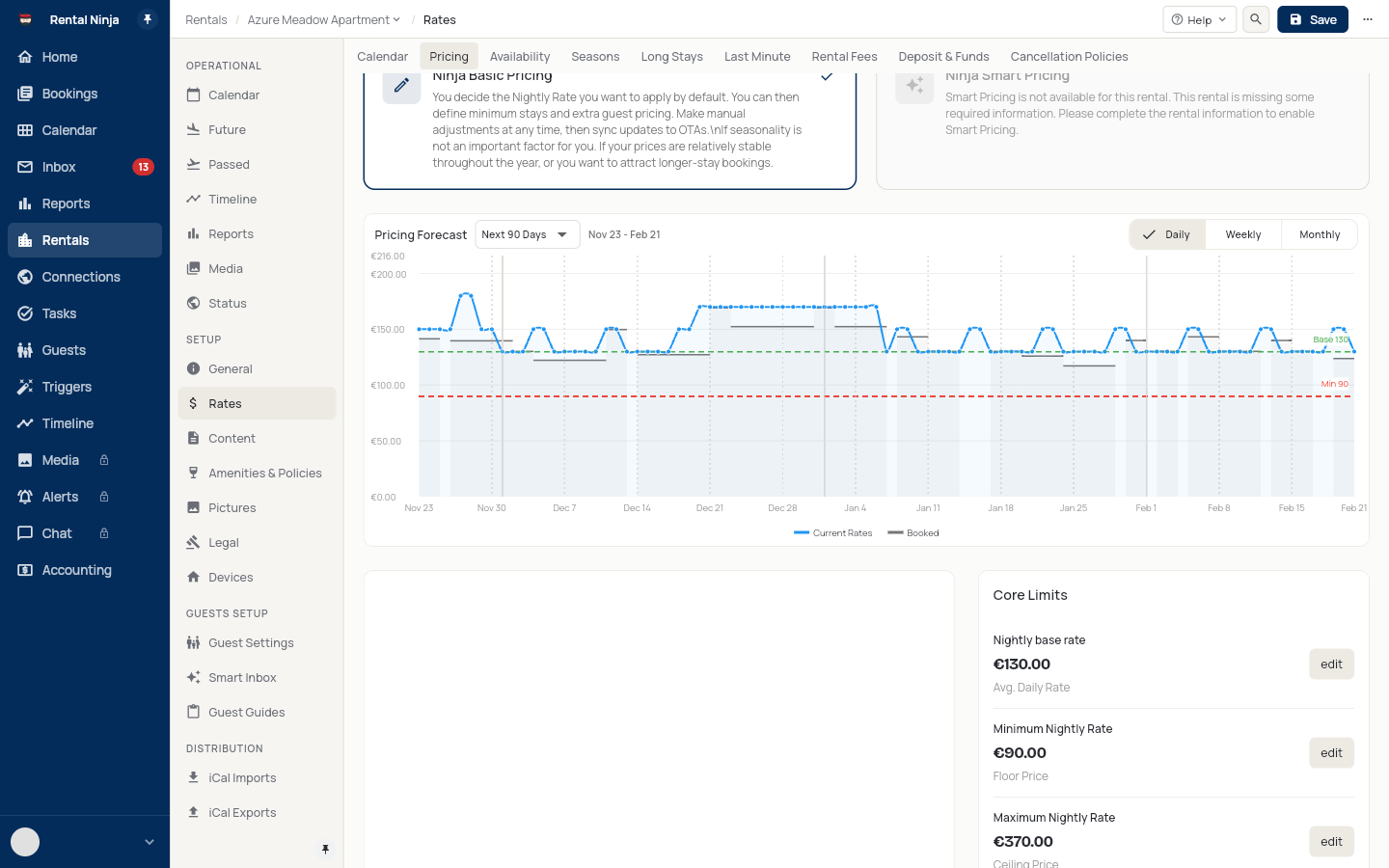
For rentals you manage in Rental Ninja, open Pricing under Rates. Compare Ninja Basic Pricing and Ninja Smart Pricing before you switch.
A rental uses one pricing model at a time, and it decides who sets the price of each night. New rentals you create start on Ninja Basic Pricing.
Under Ninja Basic Pricing and Ninja Smart Pricing, the price you set by hand for a single date wins over the model. How rates and availability work explains the layers.
| Option | Who sets the price | You keep | You give up |
|---|---|---|---|
| Ninja Basic Pricing | You, with a base rate and seasons | Every price, every season, last minute discounts | Automatic repricing when demand moves |
| Ninja Smart Pricing | Smart Pricing, within limits you set | Limits, locked dates, minimum stays, changeovers, prices by hand | Season prices, last minute discounts. It may cost extra |
Ninja Basic Pricing
Pick it when your prices follow a known calendar or stay stable all year.
Set Nightly base rate. Minimum Nightly Rate and Maximum Nightly Rate are optional.
Seasons override the base rate for the dates they cover, with a fixed price or a percentage of the base rate. You choose the weekdays they apply to.
The first season in the list that matches both the date and weekday wins. Put a summer weekend season above an all-week summer season to give weekends their own price. If nothing matches or the winning season has no price, the base rate applies.
When you set limits, the calculated season price stays at or above your minimum and at or below your maximum. Last minute discounts apply only under this model and imported pricing.
Ninja Smart Pricing
Pick it when you want Smart Pricing to handle nightly prices instead of maintaining season prices by hand. You still control the limits and can override individual dates.
Smart Pricing sets the price of each night from market data, within the Core Limits you choose. It replaces the base rate of the rental with its own. Your seasons stop setting prices but keep closing locked dates and setting extra guest prices, minimum stays and changeovers. A price you set by hand still wins, and long stay discounts still apply.
If your rental is eligible, select Ninja Smart Pricing for a Free preview before subscribing.
Turning it on may cost extra when your plan does not include it. Contact our team for pricing details. Check the switching effects in Good to know before subscribing. Smart Pricing covers the rest.
Rentals from a PMS
Set prices for rentals synced from a PMS in that PMS. These rentals have no Rates tab in Rental Ninja.
What it doesn’t do, and why
-
- Doesn’t
- Choosing Ninja Basic Pricing or Smart Pricing for a rental that a pricing tool connected to your channel manager manages.
- Why
- The channel manager rejects the prices Rental Ninja sends while the tool manages the rental.
- Instead
- Remove the rental from the tool. Once the channel manager accepts a price update from Rental Ninja, the rental moves back to Ninja Basic Pricing by itself. Your season prices take over at the next nightly recalculation, or when you save the Pricing tab.
Set it up
To use the Pricing tab, you need access to the rental and permission to edit its rates.
- Go to Rentals and open the rental.
- Open Rates, then the Pricing tab.
- Under Choose pricing model, select Ninja Smart Pricing to preview it. Stay on Ninja Basic Pricing to keep your own prices.
- For Ninja Basic Pricing, fill in Nightly base rate. Set the optional limits, then select Save. If prompted, choose whether to keep manual prices outside the new limits or adjust them to the limits.
- For Ninja Smart Pricing, select Subscribe. Confirm the amount if your plan does not include it.
- To leave Smart Pricing, select Unsubscribe. Check Nightly base rate, then select Save. Confirm the change.
Good to know
Turning Smart Pricing on deletes your last minute discounts. It clears prices set by hand when more than 100 dates from today on have one. Only prices from today on are cleared. The Last Minute tab then disappears. Unsubscribing brings neither back.
Smart Pricing needs a complete rental published to channels. See Publish a rental on channels for the channel setup. Smart Pricing must also cover the rental's location.
With Smart Pricing, choose Custom under Far Future to use a far-future minimum stay. Future Min Stay raises the minimum stay from the chosen day on.
Only for All-in-One
While Smart Pricing is on, Pause Rate Sync pauses price updates to the channel manager. Select a pause of 1 to 48 hours, then select Save. Smart Pricing keeps updating your calendar prices during the pause. Availability and discounts still go out. After the pause, the next regular sync can send the rental's current prices to the channel manager.
Imported pricing
The Imported pricing card marks read-only nightly prices our team imported during setup. Select the Ninja Basic Pricing card and fill in Nightly base rate. Select Save. If eligible, follow the Smart Pricing subscription steps above instead.
Warning
Switching deletes the imported daily prices but keeps the seasons built from them. You can't switch back in the Pricing tab.
API pricing
An integration can update prices or other daily settings with POST /client-api/v1/rentals/{rental_id}/daily-details. This switches the rental to API pricing even without prices. You can't save the Pricing tab, and seasons stop calculating prices.
Only for All-in-One
For active rentals with a channel manager property ID, the regular sync can send current prices to the channel manager when rate sync is not paused.
External pricing
Only for All-in-One
You can't select external pricing in Rental Ninja. If a tool already sets prices through the channel manager, you can't save the Pricing tab.
At the switch, Rental Ninja tries to reset each long-stay or last-minute discount type configured in Rental Ninja. This reset requires an active rental with a channel manager property ID. Regular discount updates stop, so check your discounts after switching. Rental Ninja normally omits minimum stay from availability updates.
Why it works this way
The reset targets the discount type, not who set the discount. Rental Ninja stops sending regular discount updates after the switch to avoid overwriting the pricing tool's discounts.
Rental Ninja copies channel manager prices within your bookable window. The daily update clears manual prices, extra guest prices, minimum stays and changeovers from today on, but keeps manual closures. It closes dates after the earlier of the processed pricing period and your bookable window, stopping before the date 3 years from today.
FAQ
Why does the Pricing tab refuse to save my rental?
A pricing tool connected to your channel manager manages the rental, or an integration has updated its daily details through the Rental Ninja API. Rental Ninja locks the pricing model while either one manages it.Does Smart Pricing delete my manual prices?
Turning it on deletes your last minute discounts. It also clears manual prices from today onward when more than 100 dates from today onward have a manual price. Otherwise, those prices stay and still win over Smart Pricing.Does Smart Pricing cost extra?
It may cost extra. When your plan does not include it, the app shows the amount and asks you to confirm before it turns Smart Pricing on. The card to preview it is labelled Free preview.Why is the Last Minute tab missing?
The Last Minute tab is available only under Ninja Basic Pricing. The tab disappears under Smart Pricing, and turning Smart Pricing on deletes the discounts you had.Did this solve it?
Thanks. Glad it helped.
Sorry about that. Ninja Agent can answer from this article, or you can write to support.