
SES.Hospedajes
Connect a rental in Spain to SES.Hospedajes, and Rental Ninja reports its bookings and guests there for you.
- How-to
- Rentals Guest Settings Registration Authorities
- Web
- iOS
- Android
Updated October 29, 2026
How it works
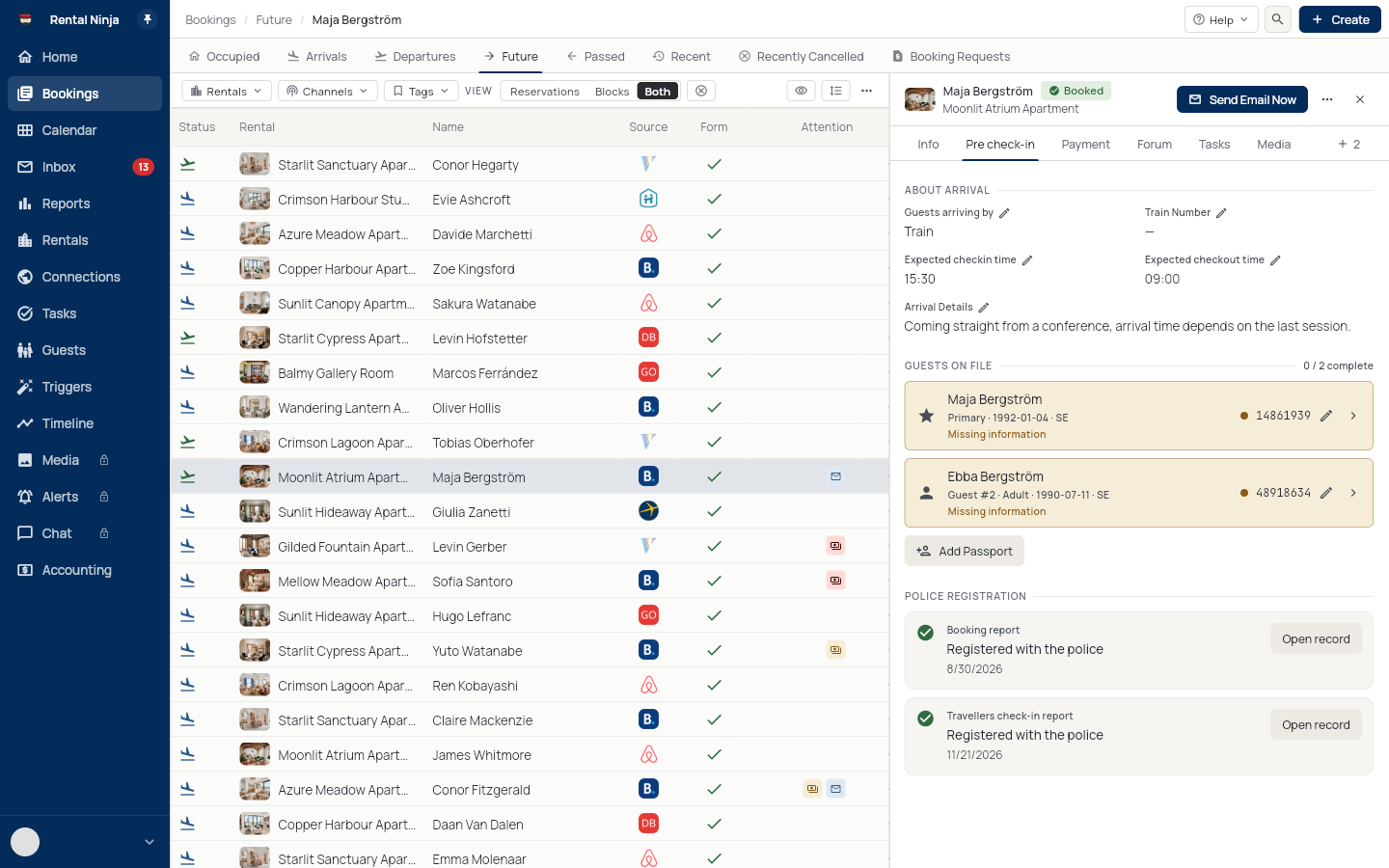
Rental Ninja files booking and travellers' check-in reports with SES.Hospedajes for you. Connect each rental in Guest Settings, under Registration Authorities. When each one goes out and where you see them work the same for both registries.
Before you connect
- Only rentals in Spain managed in Rental Ninja can connect.
- You need the Guest App General Settings permission.
- Each rental has its own connection, and SES.Hospedajes can be added once per rental. To connect several rentals, add it to each one.
- When you save, Rental Ninja checks the user and password with SES.Hospedajes. It doesn't send a test report.
The connection asks for four details, which SES.Hospedajes sends in its registration confirmation email:
| Field | What to enter |
|---|---|
| Usuario Servicio Web | The user of the web service |
| Contraseña Servicio Web | Its password |
| Código de Arrendador | Your landlord code, up to 10 characters |
| Código de Establecimiento | The establishment code of this rental, up to 10 characters |
Saving moves the rental's form to the Spain preset, as Pre-check-in forms explains.
What changes in the guest form
- Guests with a Spanish address pick their town from Spain's official list of municipalities, and the postal code must be 5 digits starting with that town's province code.
Why it works this way
SES.Hospedajes rejects a guest whose town is not on Spain's official list of municipalities, so guests with a Spanish address pick their town from that list. Some towns share their name with another one, and the postal code tells which one is meant.
- Guests with a Spanish DNI or NIE give the card's support number as well as the DNI or NIE number. A Spanish DNI also needs both surnames.
Why it works this way
A Spanish DNI or NIE carries two numbers: the DNI or NIE number identifies the person, and the support number is the card's own serial, which changes each time the card is renewed. The form asks for both, so each one goes in its own field.
- Every guest under 18 says how they are related to the main guest, as with every rental on the Spain preset.
- Guests aged 14 or over at check-in also need a document type and number.
Check the reports
Before sending, Rental Ninja checks that a Spanish town is on the official list, that a document number has at most 15 characters and a support number 1 to 9 letters or digits, and that no guest card is empty.
Rental Ninja reads the answer of SES.Hospedajes 5 minutes after sending. It checks every hour while the report is pending. You see the answer under Status Details.
After changes and cancellations
When a booking changes, Rental Ninja compares the establishment, the reference, the dates or times, the number of guests, and the main guest's name before replacing its accepted booking report. It keeps the report when that comparison finds a match. Otherwise, it cancels the accepted report first. It checks whether the cancellation has taken effect before attempting to file the new report.
Any change to the guests files the check-in report again in the same way. A change of dates or times files only the booking report again, not the check-in report. If an accepted report matches the current details, Rental Ninja does not replace it.
When a booking is cancelled, Rental Ninja cancels its accepted reports in SES.Hospedajes. Rental Ninja tries again at each hourly check for 24 hours after the cancellation.
Failed reports
A booking change can resend a report that failed Rental Ninja's data checks. The corrected details must pass validation. For other failures, select Retry. A failed check-in report can be sent again when a guest is saved, from the day before check-in.
When you change the connection, for instance to correct the password, the Update Warning reminds you to select Retry on each report that failed because of it.
Removing the connection
Open the connection under Registration Authorities. Select Delete, then Yes, Delete.
New bookings and guests stop being reported. The reports already filed stay in SES.Hospedajes: Rental Ninja doesn't cancel them. The rental keeps the Spain preset.
What it doesn’t do, and why
-
- Doesn’t
- Document numbers longer than 15 characters.
- Why
- SES.Hospedajes accepts at most 15 characters for a document number, and refuses the whole check-in report otherwise.
- Instead
- Correct the guest's document number in the booking's Pre check-in tab. Save the guest to trigger another attempt on an active booking, up to 10 days after checkout. The form must be complete.
-
- Doesn’t
- Cancelling a report filed with a previous SES.Hospedajes account.
- Why
- SES.Hospedajes keeps each account's reports apart, so the account connected now can't cancel them.
- Instead
- Rental Ninja treats those reports as cancelled and files the new one. If an old report has to go, cancel it in SES.Hospedajes with the old account.
Set it up
- On the SES.Hospedajes website, open "Mis datos registrados" and enable "Envío de comunicaciones por servicio web". If you are registering a new account, select this option during registration.
- Go to Rentals and open the rental.
- Open Guest Settings, then the Registration Authorities tab.
- Select Create Registration Authority.
- Under Authority, choose Ses Hospedajes.
- Fill in the four fields with the details from SES.Hospedajes.
- Select Save.
Good to know
- Rentals synced from another PMS don't show Registration Authorities. Outside Spain, the option is greyed out with This rental is not located in Spain.
- If the user or password is wrong, nothing is saved. The two codes are not checked, so copy them with care.
- When you edit the connection, leave the password as it is to keep it.
- If the current booking details fail validation, the accepted booking report may still be cancelled. Check the replacement report for errors.
- After about an hour without cancellation confirmation, Rental Ninja attempts to file the new report. The rental must still have its connection. The booking must still be active. Checkout must be no more than 10 days ago. Check-in reports also require a completed form. If the cancel request itself fails, nothing is filed again.
- If SES.Hospedajes doesn't accept a cancellation, the report still shows as accepted. Check in SES.Hospedajes that it was cancelled.
- When SES.Hospedajes doesn't answer, the next hourly check tries again. Check-in reports are retried this way only on check-in day. After check-in day such a report is not retried, leaves no failed report to retry and raises no alert. Save a guest again to trigger another attempt on an active booking. Checkout must be no more than 10 days ago. The pre-check-in form must be complete. These limits also apply to guest saves for failed check-in reports.
- Without an accepted check-in report, saving a guest can trigger another reporting attempt. The details do not need to have changed. The guest-save limits above still apply.
- Booking changes can retry data-validation failures on active bookings within 10 days after checkout.
- Error texts, from Rental Ninja's checks and from SES.Hospedajes, are in Spanish, except the wrong user or password error, which is in your language.
FAQ
I get an identification error when I connect a rental, although my credentials are right. Why?
When you save, Rental Ninja checks the user and password with SES.Hospedajes, and shows this error whenever the check fails. Use the user and password of the Servicio Web, from the registration confirmation email SES.Hospedajes sent you. If SES.Hospedajes is not answering, the check fails too: try again later.Can I connect my other rooms with the same credentials?
Yes. Each rental has its own connection, so add SES.Hospedajes to each room or apartment, with the same user, password and landlord code. Enter the establishment code of the establishment that room belongs to in SES.Hospedajes.I fixed the booking, but the failed booking report was not sent again. Why?
A booking change can resend a report that failed Rental Ninja's data checks. The corrected details must pass validation. The booking must still be active and within the reporting window. For other failures, select Retry. Open it from the alert or from Authority Communications, check that the cause is fixed, and select Retry.The guest changed their email. Is the booking report filed again?
Usually not for an accepted booking report. Contact and payment details are not part of the comparison Rental Ninja uses before replacing it. If the current booking details fail validation, the accepted report may still be cancelled. Check the replacement report for errors.Did this solve it?
Thanks. Glad it helped.
Sorry about that. Ninja Agent can answer from this article, or you can write to support.