
Block dates
Close dates on a rental for maintenance, an owner stay or a closed season, and learn how to cancel the block.
- How-to
- Rentals Calendar
- Web
- iOS
- Android
Updated October 29, 2026
How it works
Close dates on one rental from the calendar or the rental page without creating a stay. Use a block for maintenance, the owner's own stay or a season you don't rent out.
Rental Ninja stores a block as a booking of the type Blocked Dates. It takes the dates off the calendar like a booking does, but you don't need to enter a guest or a price. In booking lists that offer a choice of views, select Blocks to see just blocks or Both to see them with bookings.
Who can block and cancel
You need the Block dates permission, which roles and permissions explains. Owners, administrators, rental managers and rental owners have it by default, for the rentals they can access.
Changing or cancelling a block is stricter. In the app, owners, administrators and rental managers with the permission can manage eligible blocks made by others on rentals they can access.
What a block does
On a Rental Ninja rental the date picker uses the rental's availability. Minimum stay and check-in days don't apply to a block. Your calendar adds no preparation days around it, because only booked stays get them.
Occupancy reports count blocked nights as occupied while the filter Show Unavailable Bookings is on. Turn it off to leave blocks out.
Eligible team members with access to the rental can receive a push notification when they have block notifications on. Cancelling one can send the usual cancellation message. See Notifications.
What reaches your channels
Only for All-in-One
For rentals active in the built-in channel manager, creating or cancelling a block queues an availability update for the blocked period. If you change the dates on the same rental, the update covers the old and new periods together. If you move the block to another rental, Rental Ninja checks each rental separately for an update.
Why it works this way
When you edit a block, Rental Ninja refreshes availability for the period the block used to cover as well as the new period. That lets nights the block no longer covers become bookable again if nothing else keeps them closed.
An update to the channel manager doesn't confirm that a channel has applied it. Check the calendar on each channel where the rental is listed. See Publish a rental on channels for how to connect and publish on each channel.
Delete a block
Open the block and select Cancel, then confirm. If the block is managed in Rental Ninja, it becomes a canceled booking. Cancelling that block removes its hold on those nights, but another booking or closure can still keep them unavailable. Only those who may manage the block see Cancel.
For a block managed in your PMS, check its calendar after cancelling.
What it doesn’t do, and why
-
- Doesn’t
- Changing the dates of a block on a rental synced from a PMS.
- Why
- Rental Ninja lets you change a block's dates only when it manages both the rental and the block.
- Instead
- If the block is managed in your PMS, change it there. If the block can be cancelled in Rental Ninja, you can cancel it and create a new one with the right dates.
Set it up
- Open the calendar.
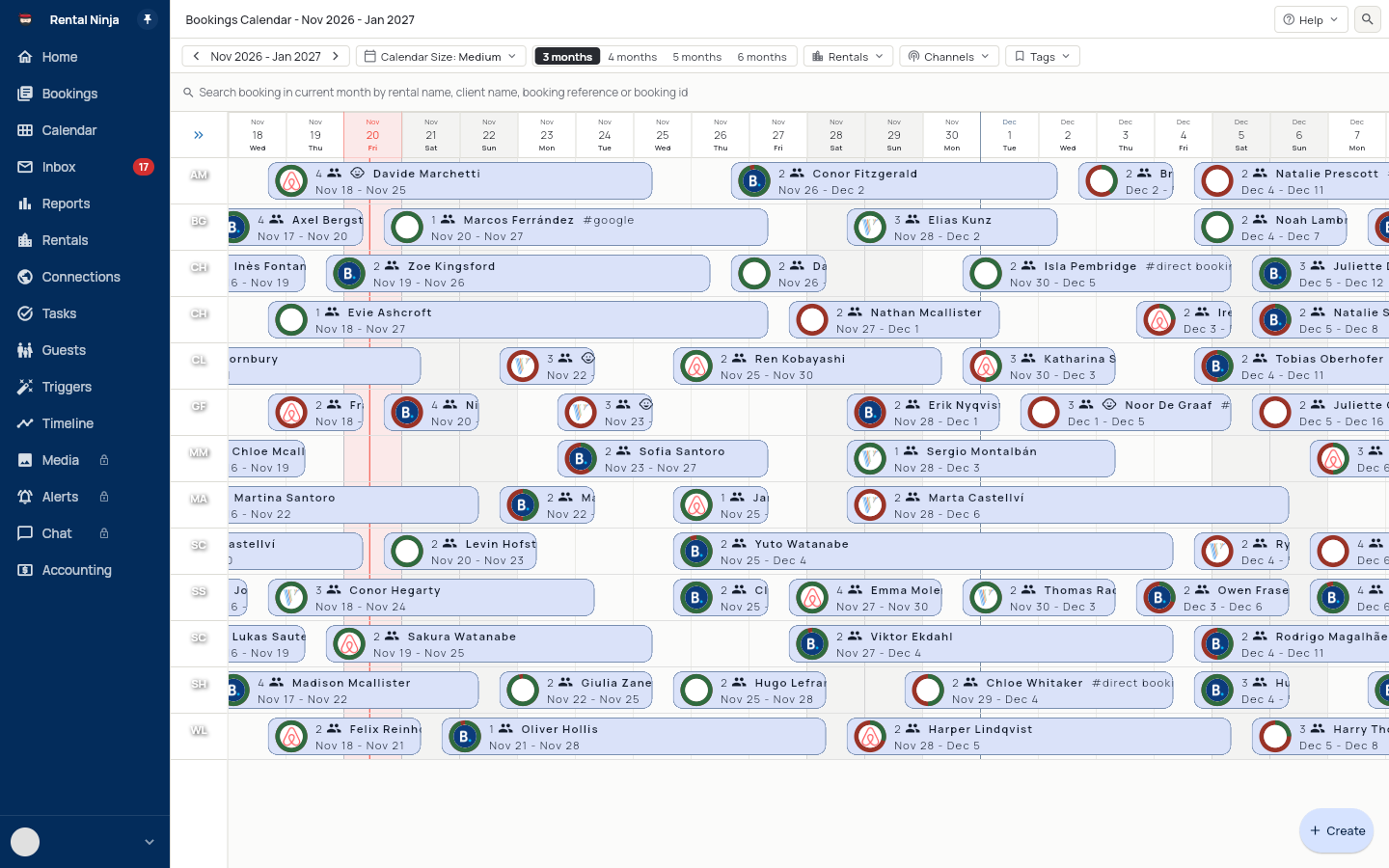
- In a desktop browser, drag across the dates on the rental's row. On a phone, or if you can't drag on the calendar, open the calendar's action menu and choose Create.
- In the form that opens, set Booking Type to Blocked Dates if it is not already selected.
- Select the rental if it isn't already filled in.
- Check Booking Dates. Use the first night you want to close as the start date and the day after the last night as the end date. Make sure the range doesn't include nights already held by another booking.
- Choose a Booking Source if the field appears. It is required when shown. If you don't have permission to manage bookings, Rental Ninja chooses the source for you.
- Add a note if you want to record why.
Why it works this way
The form has a note field, so you can record the reason for a block when you make it.
- Select Save.
Good to know
- You can also open the rental and select Block Dates where that action is available. If you can also create bookings there, the button reads Create Booking. Set Booking Type to Blocked Dates before continuing with the dates.
- Check-in agents, cleaning and maintenance staff and members don't have the Block dates permission by default. In the app, other roles with the permission, including rental owners, can change or cancel eligible blocks only if they created them.
- Changing a block's dates requires a Rental Ninja rental. The block must not have come from another system. On a rental synced from a PMS, cancel the block and create a new one if Cancel is available. Otherwise, manage the block in the system it came from.
- For a rental synced from Smoobu or BookingSync, Rental Ninja sends block creation and cancellation requests to that system.
- The rental's iCal feed lists blocks as events named Booking. The feed covers today to 3 years ahead and includes only the selected sources if you have chosen any.
- A scheduled task is created for a block only if the task has Create for unavailable bookings (blocks) on.
- The note field shows only if you may edit internal notes.
- A block cancellation can also produce a Slack notification for teams able to receive Slack alerts. Booking cancellation alerts must be on.
FAQ
Why can't I cancel a block that someone else made?
In the app, owners, administrators and rental managers who have the Block dates permission can cancel eligible blocks made by others on rentals they can access. Anyone else with the permission, rental owners included, can cancel only the blocks they created.Is a block a booking?
It is stored as one, with the type Blocked Dates, so it takes the dates off the calendar. You don't need a guest or a price to create one. In booking lists that offer a choice of views, select Blocks to see just blocks or Both to see them with bookings.Can I block dates that already have a booking?
Choose free nights for a new block. On a Rental Ninja rental the date picker uses the rental's availability, but a range brought in from the calendar can already have dates filled in. Check the whole range for existing bookings before you save.Did this solve it?
Thanks. Glad it helped.
Sorry about that. Ninja Agent can answer from this article, or you can write to support.