
ID scans and identity checks
How the scan reads a guest's passport or ID card, what it checks, what happens when it fails, and what you see in the booking.
- Concept
- Bookings Pre check-in
- Web
- iOS
- Android
- Guest portal
Updated October 29, 2026
How it works
When your rental asks guests for ID with Document Scan or Identity Check, guests scan their passport or ID card in the guest portal. You review the results in the booking's Pre check-in tab.
Who is scanned
With Document Scan or Identity Check, every guest the preset asks for an ID is scanned. These are the scanning modes under Scan ID. Under Identity Check, every one of them also takes a selfie. Choose the mode in Pre-check-in forms.
How the scan reads a document
Guests choose between a passport and an ID card. A passport needs a photo of the page with the guest's picture. An ID card needs both sides, and the scan runs once both are in.
Rental Ninja reads the machine-readable zone: the lines of letters and << at the bottom of the passport page, or on one side of the card. The scan also refuses an ID card uploaded as a passport, or the reverse.
Rental Ninja checks the document and fills in:
- Name, date of birth and sex.
- Nationality and issuing country.
- Document number and expiry date.
The checks on every scan
| Check | The scan is refused when |
|---|---|
| Duplicate | The guest is identified as already registered in this booking |
| Age | The age at check-in doesn't fit: the main guest must be 18 or over, another adult older than the rental's child age, a child between 2 and the rental's child age, a baby under 2 |
| ID card country | The rental's country doesn't accept ID cards from the issuing country |
| Expiry | The document has already expired on the day of the scan |
Passports are accepted from every country. ID cards are accepted from the rental's own country and the countries on its list. Otherwise the guest is asked for a passport.
When a scan fails
The guest is told what went wrong and which side to take again. After 2 failed scans, they can type their details instead. They can still choose to scan again.
The photo from the failed scan stays on file. Rental Ninja compares the typed details with it. When the typed details are verified against the document, the entry is saved as checked.
Until the scan or the typed details go through, the guest isn't complete and the form can't be finished. The main guest must be 18 or over here too.
The selfie
Under Identity Check, the selfie comes after a successful scan. It is compared with the face the scan cuts out of the document.
It must show the guest's face and no document. It must differ from the document picture, look natural and closely match the document photo. A selfie that fails is deleted and the guest takes another.
What you see in the booking
Open the booking and its Pre check-in tab.
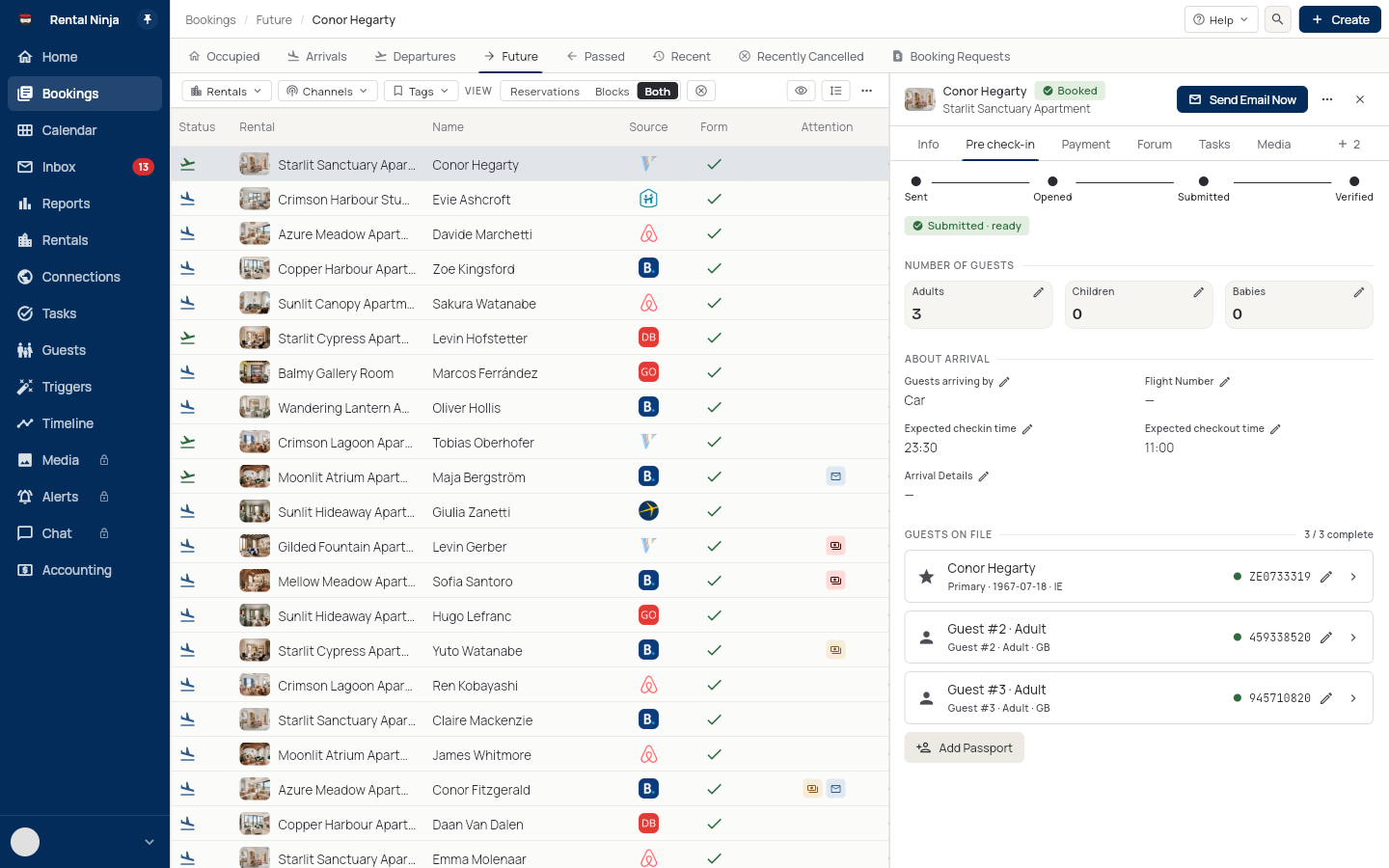
Open a guest to see Identity Checks:
- Verified with DocScan: the document was scanned, or the typed details were verified against the document.
- Face Verified: the selfie matched.
- Face Verification Rejected: the selfie hasn't matched yet, or the guest sent it for manual review.
Buttons open each stored image:
- Front and Back.
- Selfie and Face.
- Signature.
To act on a guest, see Review, complete or export a check-in.
What it costs
Scans may cost extra. Contact our team for pricing details. Only successes count:
| Result | Use counted |
|---|---|
| Successful document scan | 1 scan |
| Selfie that matches under Identity Check | 1 scan |
| Typed details verified against the document | 1 AI use |
| Failed scan or selfie | None |
| "Continue Anyway" | None |
Good to know
Children and babies are scanned only when every guest is asked for an ID, as with All Guests. With Spain, guests aged 14 or over are scanned and younger children are not.
Document-number matching applies to adults with the same issuing country.
A rental in Spain accepts ID cards from the EU, Iceland, Liechtenstein, Norway, Switzerland and Andorra. For foreign ID cards, a rental in the UK only accepts Irish ones. A document that expires between the scan and the stay still passes.
If typed details don't match the photo, the guest is told so and can review them or choose "Continue Anyway". That saves them unchecked, for staff to review. If the comparison can't run, the details are accepted and saved unchecked.
A guest who can't pass, or who typed their details in and so has no face to compare, can send the entry for manual review instead. The form can then be finished.
A guest whose scan is still due shows Document not scanned. The same label appears for typed details saved unchecked. Any other guest who isn't complete shows Missing information.
The document, selfie and face buttons go away once ID Storage deletes their image.
Note
Typed details saved with "Continue Anyway", or never compared, don't get Verified with DocScan. Check those guests yourself. If a document image is available, compare it with the guest's document.
On the Smart Plan, scans and AI uses are included.
What it doesn’t do, and why
-
- Doesn’t
- Scanning a driving licence, or any document other than a passport or ID card.
- Why
- The scan reads passports and ID cards only.
- Instead
- Use Custom with Scan ID set to Manual, and turn on Accept Other Documents. Guests type their details and you check the document.
-
- Doesn’t
- Checking the selfie of a guest who typed their details in after failed scans.
- Why
- The selfie is compared with the face the scan cuts out of the document, and typed-in details come without one.
- Instead
- The guest sends the entry for manual review. Open the guest in the booking and compare the Front image with the person at check-in. With ID Storage on No, it is there until check-out.
FAQ
The rental is set up without a selfie, so why are guests asked for one?
Only Identity Check asks for a selfie. Scan ID is set for each rental, so check it on the rental of that booking. The form follows the rental's current setting, so a change applies to every guest who hasn't reached the selfie yet.A guest says the photo of their passport won't upload. What can they do?
A gallery photo the browser can't read, often an iPhone picture, is refused with a message to use the camera instead. After 2 failed scans, the guest can type their details instead of scanning.Does a failed scan cost anything?
No. A successful document scan counts as one scan, a selfie that matches as another, and typed-in details verified against the document as one AI use. Nothing else counts.Did this solve it?
Thanks. Glad it helped.
Sorry about that. Ninja Agent can answer from this article, or you can write to support.