
Guest registration with the police
How Rental Ninja reports each stay to the police in Spain, when each report goes out, and how to fix one that failed.
- Concept
- Guests Authority Communications
- Web
- iOS
- Android
Updated October 29, 2026
How it works
For rentals in Spain, Rental Ninja reports your bookings and guests to the police for you. It works with two registries only, SES.Hospedajes and Mossos d'Esquadra. You connect each rental to one of them, or both, under Registration Authorities, in the rental's Guest Settings.
Every stay gets two reports: a booking report, and a travellers' check-in report with the guests' details. Each one is filed, checked and retried on its own, so one can succeed while the other fails.
When each report goes out
Rental Ninja looks for reports to file every hour.
| Report | When it goes out | What it needs |
|---|---|---|
| Booking report | At the first hourly check after the booking has been in Rental Ninja for 2 hours, while its check-out is still ahead | A guest on the booking, with a first name, a surname, and a phone or an email |
| Travellers' check-in report | On check-in day, in the rental's time zone | The pre-check-in form, marked completed |
Only confirmed bookings are reported.
Nothing is filed before the check-in is completed
The check-in report waits until the pre-check-in form is marked completed, by the guest in the guest portal or by you from the booking, as Review, complete or export a check-in explains. A form completed 2 days or more before arrival is filed on check-in day. A form completed from the day before check-in onwards is filed as soon as it is completed, even after the guests have arrived.
Warning
A stay whose form is never completed gets no check-in report. Make sure every check-in is completed by arrival day.
Changes after filing
From the day before check-in, or once the check-in report has been filed, saving or removing a guest, or completing the form again, files it again. Editing the form's guest counts or arrival doesn't. Each registry takes changes its own way: SES.Hospedajes replaces a report whose details changed, and Mossos d'Esquadra receives only the guests added since the upload. Only SES.Hospedajes is told about booking changes and cancellations.
Rental Ninja sends changes up to 10 days after check-out, and nothing after that.
Errors caught before sending
Before sending a report, Rental Ninja checks it against what the registry requires. If anything is missing, nothing is sent: the report is recorded as failed, with every missing field listed guest by guest. The list is in Spanish whatever your language, and starts with "Faltan campos requeridos".
A guest card nobody filled in blocks the whole check-in report with "ficha vacía, sin datos". Delete the card or complete it in the booking's Pre check-in tab.
Alerts
A failed report raises an alert on the booking, Booking Report Error or Check-in Report Error, which shows the cause. Users with the Guest App module permission get these alerts.
When the hourly check should file a report and doesn't, the same alert appears 15 minutes later, with a cause that starts "Missing Communication". Usually the booking has no guest (booking report) or the form isn't marked completed (check-in report): add the guest or complete the form. It also appears when the registry didn't answer or, with Mossos d'Esquadra, while the report waits its turn to upload. The next hourly check tries again.
The alert disappears as soon as a later report of the same kind succeeds.
Where you see the reports
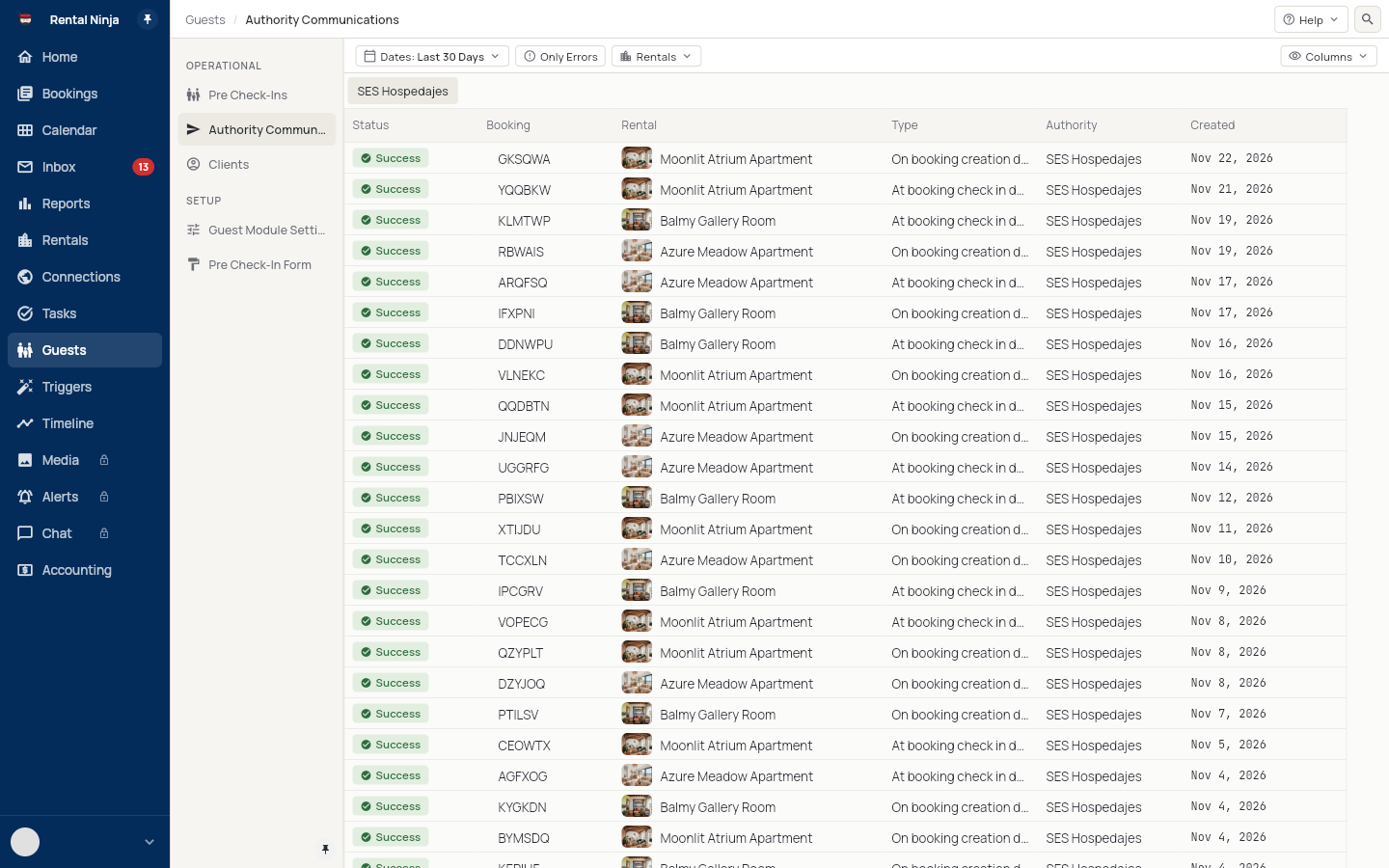
- Guests › Authority Communications lists every report, with a tab for each registry your team uses. It appears once one of your rentals is connected. Filter by rental and by when the report was sent, or turn on Only Errors. Open a report to read the registry's answer under Status Details, and what went wrong under Error Details.
- On rentals in Spain, the booking's Pre check-in tab has a Police registration card with the state of its Booking report and its Travellers check-in report.
- The booking's timeline shows "Authority Report Submitted" for each report sent.
Each report is Pending, Success or Error.
Retry
Open a failed report, fix the cause, then select Retry. You can retry the latest report of each kind on a booking. A retry snoozes the booking's alert for 15 minutes, for everyone who gets it.
Some failures are retried without you:
- A failed check-in report is sent again when a guest is saved or removed, from the day before check-in until 10 days after check-out.
- When the registry is down or doesn't answer, the next hourly check tries again. For the check-in report, that only happens on check-in day. After check-in day such a report is not retried, leaves no failed report to retry and raises no alert: save a guest again to resend it.
- A failed booking report needs Retry with SES.Hospedajes. With Mossos d'Esquadra, editing the booking or its guest sends it again.
- A wrong password fails every report. Correct it under Registration Authorities, then select Retry on each failed report.
What it doesn’t do, and why
-
- Doesn’t
- Filing the check-in report while one guest card is empty.
- Why
- A card that is not a real traveller is a mistake in the form, and only you can tell whether it should be deleted or completed.
- Instead
- Delete the empty card, or complete it, in the booking's Pre check-in tab. The report then goes out with the other guests.
FAQ
The police ask for the last 3 months of reports for one apartment. Where do I find them?
Open Guests, then Authority Communications, and filter by the rental and by when the reports were sent: you see each report with its type and status. For a document with the guests' details and signatures, select Export signed records (PDF) under Guests › Pre Check-Ins, as Review, complete or export a check-in explains.The report for the guests staying now shows an error. How do I fix it?
Open the alert, or the booking's Police registration card, to read the cause: it lists what is missing, guest by guest. Fix it in the booking's Pre check-in tab. Saving the guest sends the check-in report again. If it still fails, fix what is left and select Retry.What does an alert that starts with Missing Communication mean?
A report the hourly check should have filed didn't go out. Usually the booking has no guest (booking report) or the form isn't marked completed (check-in report). It also appears when the registry didn't answer or, with Mossos d'Esquadra, while the report waits its turn to upload. The next hourly check tries again, and the alert disappears once it succeeds.Did this solve it?
Thanks. Glad it helped.
Sorry about that. Ninja Agent can answer from this article, or you can write to support.